阿里云 CentOS 7 安装 Zimbra-8.8.15开源邮件系统


邮件系统,那是企业必备,你可以选择目前市面上已有的各种企业邮箱,如阿里企业邮箱,腾讯企业邮箱……你需要为每一个账户买单费用还不少,当然如果你有技术实力也可以选择使用开源邮件系统进行搭建,主要有Zimb......
邮件系统,那是企业必备,你可以选择目前市面上已有的各种企业邮箱,如阿里企业邮箱,腾讯企业邮箱……你需要为每一个账户买单费用还不少,当然如果你有技术实力也可以选择使用开源邮件系统进行搭建,主要有Zimbra,iRedMail,ExtMail….
这其中我喜欢的还是Zimbra,开源免费,随便你建多少用户都可以,功能相当丰富,完美的web端可自适应各种浏览器,方便用户随时查收邮件,除了最基本的邮件收发,额外的一些功能更是外企必备,特别是日历功能,不像其他邮箱的日历也就是本地日历自己玩,Zimbra的日历是和Gmail,Yahoo等日历是一样的可分享给其他人,外企必备啊,主要外国人喜欢用日历。此外,还有Zimlet类似于一些插件,可以通过插件丰富你的邮件系统。
iRedMail和ExtMail以前用过,也还可以,但当时个人感觉还是有些局限,不知道现在怎么样,所以我还是推荐Zimbra。
Zimbra有两个版本,一个是NETWORKEDITION网络版,像企业邮箱一样,你付钱使用就可以了,另一个就是OPENSOURCE开源版,开源免费随便用。
接下来介绍如何在阿里云的服务器上搭建起属于我们自己的邮件系统。
环境:地域:香港
系统:位
公网IP:47.52.194.54
内网IP:172.16.12.249
域名:
Zimbra版本:
Zimbra下载地址:
一、准备工作1.开放以下端口:
80,443,25,110,143,465,995,993,587,7025,8443,7071
由于是在阿里云上,所以请前往安全组开启以上端口:

2.配置主机名
[root@iZ2ze1mxb0c9j7l4rr6oxkZ~]echo'172.16.12.249'/etc/hosts
4.检查并停止smail和postfix,如果服务器上有的话
systemctldisablesmailsystemctldisablepostfix
5.重启系统,确保都生效了
reboot二、安装dnsmasq
1.安装dnsmasq
[root@mail~]systemctlstartdnsmasq
5.测试
[root@mail~]53(127.0.0.1);;WHEN:ThuNov2821:07:17CST2019;;MSGSIZErcvd:88
可以看到A记录成功解析到以及MX记录成功解析到
三、安装Zimbra安装过程如下:
[root@mail~]wget;--下载Zimbra软件包[root@mailtmp]_GA_3869.RHEL7_64.20190918004220[root@_GA_3869.RHEL7_64.20190918004220]./开始安装Operationsloggedto/tmp/ra-imapdNOTFOUNDzimbra-patchNOTFOUNDzimbra-mta-patchNOTFOUNDzimbra-proxy-patchNOTFOUNDzimbra-license-toolsNOTFOUNDzimbra-license-extensionNOTFOUNDzimbra-network-storeNOTFOUNDzimbra-network-modules-ngNOTFOUNDzimbra-chatNOTFOUNDzimbra-talkNOTFOUNDzimbra-ldapNOTFOUNDzimbra-loggerNOTFOUNDzimbra-mtaNOTFOUNDzimbra-dnscacheNOTFOUNDzimbra-snmpNOTFOUNDzimbra-storeNOTFOUNDzimbra-apacheNOTFOUNDzimbra-spellNOTFOUNDzimbra-convertdNOTFOUNDzimbra-memcachedNOTFOUNDzimbra-proxyNOTFOUNDzimbra-archivingNOTFOUNDzimbra-coreNOTFOUND----------------------------------------------------------------------,INC.("SYNACOR")WILLONLY,ORUSINGTHEPRODUCT,,THENDONOTDOWNLOAD,:[N]yUseZimbra''spackagerepository[Y]yImportingZimbraGPGkeyConfiguringpackagerepositoryCheckingforinstallablepackagesFoundzimbra-core(local)Foundzimbra-ldap(local)Foundzimbra-logger(local)Foundzimbra-mta(local)Foundzimbra-dnscache(local)Foundzimbra-snmp(local)Foundzimbra-store(local)Foundzimbra-apache(local)Foundzimbra-spell(local)Foundzimbra-memcached(repo)Foundzimbra-proxy(local)Foundzimbra-drive(repo)Foundzimbra-imapd(local)Foundzimbra-patch(repo)Foundzimbra-mta-patch(repo)Foundzimbra-proxy-patch(repo)SelectthepackagestoinstallInstallzimbra-ldap[Y]yInstallzimbra-logger[Y]yInstallzimbra-mta[Y]yInstallzimbra-dnscache[Y]yInstallzimbra-snmp[Y]yInstallzimbra-store[Y]yInstallzimbra-apache[Y]yInstallzimbra-spell[Y]yInstallzimbra-memcached[Y]yInstallzimbra-proxy[Y]yInstallzimbra-drive[Y]yInstallzimbra-imapd(BETA-forevaluationonly)[N]yInstallzimbra-chat[Y]yCheckingrequiredspaceforzimbra-coreCheckingspaceforzimbra-storeChecking:zimbra-corezimbra-ldapzimbra-loggerzimbra-mtazimbra-dnscachezimbra-snmpzimbra-storezimbra-apachezimbra-spellzimbra-memcachedzimbra-proxyzimbra-drivezimbra-imapdzimbra-patchzimbr?[N]yBeginningInstallation-see/tmp/(later).(later).zimbra-mta-patchwillbedownloadedandinstalled(later).zimbra-proxy-patchwillbedownloadedandinstalled(later).zimbra-chatwillbedownloadedandinstalled(later).Downloadingpackages(11):zimbra-core-componentszimbra-ldap-componentszimbra-mta-componentszimbra-dnscache-componentszimbra-snmp-componentszimbra-store-componentszimbra-jetty-distributionzimbra-apache-componentszimbra-spell-componentszimbra-memcachedzimbra-proxy-componentsdoneRemoving/opt//etc/security/(11):zimbra-core-componentszimbra-ldap-componentszimbra-mta-componentszimbra-dnscache-componentszimbra-snmp-componentszimbra-store-componentszimbra-jetty-distributionzimbra-apache-componentszimbra-spell-componentszimbra-memcachedzimbra-proxy-componentsdoneInstallinglocalpackages(27):zimbra-timezone-datazimbra-common-core-jarzimbra-common-mbox-confzimbra-common-mbox-conf-attrszimbra-common-mbox-conf-msgszimbra-common-mbox-conf-rightszimbra-common-mbox-dbzimbra-common-mbox-docszimbra-common-mbox-native-libzimbra-common-core-libszimbra-corezimbra-ldapzimbra-loggerzimbra-mtazimbra-dnscachezimbra-snmpzimbra-mbox-confzimbra-mbox-warzimbra-mbox-servicezimbra-mbox-webclient-warzimbra-mbox-admin-console-warzimbra-mbox-store-libszimbra-storezimbra-apachezimbra-spellzimbra-proxyzimbra-imapddoneInstallingextrapackages(5):zimbra-drivezimbra-patchzimbra-mta-patchzimbra-proxy-patchzimbra-chatdoneRunningPostInstallationConfiguration:Operationsloggedto/tmp/hangedomainname?[Yes]yes--yes同意Createdomain:[]要求输入有MX记录的域名,输入:(172.16.12.249)Interface:127.0.0.1Interface:172.16.12.249:53(zimbra-dnscache)Portconflictdetected:53(zimbra-dnscache)Portconflictsdetected!-PressEnter/ReturnkeytocontinueMainmenu1)CommonConfiguration:2)zimbra-ldap:Enabled3)zimbra-logger:Enabled4)zimbra-mta:Enabled5)zimbra-dnscache:Enabled6)zimbra-snmp:Enabled7)zimbra-store:Enabled+CreateAdminUser:yes+Adminusertocreate:admin@*******+AdminPasswordUNSET+Anti-virusquarantineuser:@+Enableautomatedspamtraining:yes+Spamtraininguser:@+Non-spam(Ham)traininguser:@+SMTPhost:+WebserverHTTPport:8080+WebserverHTTPSport:8443+Webservermode:https+IMAPserverport:7143+IMAPserverSSLport:7993+POPserverport:7110+POPserverSSLport:7995+Usespellcheckserver:yes+SpellserverURL:(servicewebapp):yes+InstallUI(zimbra,zimbraAdminwebapps):yes8)zimbra-spell:Enabled9)zimbra-proxy:Enabled10)zimbra-imapd:Enabled11)DefaultClassofServiceConfiguration:s)Saveconfigtofilex)Expandmenuq)QuitAddressunconfigured(**)items(?-help)7--管理员密码没有设置,按7进入管理员设置菜单Storeconfiguration1)Status:Enabled2)CreateAdminUser:yes3)Adminusertocreate:admin@**4)AdminPasswordUNSET5)Anti-virusquarantineuser:@)Enableautomatedspamtraining:yes7)Spamtraininguser:@)Non-spam(Ham)traininguser:@)SMTPhost:)WebserverHTTPport:808011)WebserverHTTPSport:844312)Webservermode:https13)IMAPserverport:714314)IMAPserverSSLport:799315)POPserverport:711016)POPserverSSLport:799517)Usespellcheckserver:yes18)SpellserverURL:)Enableversionupdatechecks:TRUE20)Enableversionupdatenotifications:TRUE21)Versionupdatenotificationemail:admin@)Versionupdatesourceemail:admin@)Installmailstore(servicewebapp):yes24)InstallUI(zimbra,zimbraAdminwebapps):yesSelect,or'r'forpreviousmenu[r]4--按4设置管理员密码Passwordforadmin@(min6characters):[XODMeCq7]123678--我这里设置管理员密码为123678Storeconfiguration1)Status:Enabled2)CreateAdminUser:yes3)Adminusertocreate:admin@)AdminPasswordset5)Anti-virusquarantineuser:@)Enableautomatedspamtraining:yes7)Spamtraininguser:@)Non-spam(Ham)traininguser:@)SMTPhost:)WebserverHTTPport:808011)WebserverHTTPSport:844312)Webservermode:https13)IMAPserverport:714314)IMAPserverSSLport:799315)POPserverport:711016)POPserverSSLport:799517)Usespellcheckserver:yes18)SpellserverURL:)Enableversionupdatechecks:TRUE20)Enableversionupdatenotifications:TRUE21)Versionupdatenotificationemail:admin@)Versionupdatesourceemail:admin@)Installmailstore(servicewebapp):yes24)InstallUI(zimbra,zimbraAdminwebapps):yesSelect,or'r'forpreviousmenu[r]r--设置完成,按r返回上级菜单Mainmenu1)CommonConfiguration:2)zimbra-ldap:Enabled3)zimbra-logger:Enabled4)zimbra-mta:Enabled5)zimbra-dnscache:Enabled6)zimbra-snmp:Enabled7)zimbra-store:Enabled8)zimbra-spell:Enabled9)zimbra-proxy:Enabled10)zimbra-imapd:Enabled11)DefaultClassofServiceConfiguration:s)Saveconfigtofilex)Expandmenuq)Quit***CONFIGURATIONCOMPLETE-press'a'toapplySelectfrommenu,orpress'a'toapplyconfig(?-help)a--按a应用设置Saveconfigurationdatatoafile?[Yes]yes--yes保存配置到文件Saveconfiginfile:[/opt/zimbra/]--直接回车,保存到配置到文件/opt/zimbra//opt/zimbra/?[No]yes--yes继续安装Operationsloggedto/tmp//opt/zimbra/conf/==sQueryingLDAPaddress(es)'1557224584'@@@@_zimbra__zimbra_proxy__zimbra__zimbra__zimbra__zimbra__zimbra_cert__zimbra__zimbra__zimbra__zimbra__zimbra__zimbra__zextras_chat__zimbra__zextras_drive__zimbra__zimbra__zimbra_:TheVERSIONofzcsinstalled(8.8.15_GA_3869_RHEL7_64)TheADMINEMAILADDRESScreated(admin@)NotifyZimbraofyourinstallation?[Yes]/tmp//opt/zimbra/logConfigurationcomplete-pressreturntoexit[root@_GA_3869.RHEL7_64.20190918004220]su-zimbra--切换到zimbra用户下Lastlogin:ThuNov2821:30:21CST2019onpts/0[zimbra@mail~]$[zimbra@mail~]$zmcontrolstatus--查看zimbra服务运行状态mapdRunningldapRunningloggerRunningmailboxRunningmemcachedRunningmtaRunningopkimRunningproxyRunningservicewebappRunningsnmpRunningspellRunningstatsRunningzimbrawebappRunningzimbraAdminwebappRunningzimletwebappRunningzmconfigdRunning全部启动成功。如果有没启动成功的,请等一等再看,启动服务需要时间。
四、配置公网DNS为了能够正常的在公网上收发邮件,访问我们的邮件系统,我们还需要为邮件服务器配置公网DNS,分别设置一条A记录和MX记录,我这里用的是阿里云的云解析,如下:

设置好后,稍等一会等待生效后即可通过域名访问。
普通用户访问地址为:
管理员访问地址为:
管理员用户名:admin
管理员密码:即安装时提示你设置的密码,我这里是123678
注意:现在登录还会提示你证书错误,所以我们还需要给服务器配置可信任的证书,这里先忽略这个提示,下一篇文章再继续讲述。
非常重要提示:
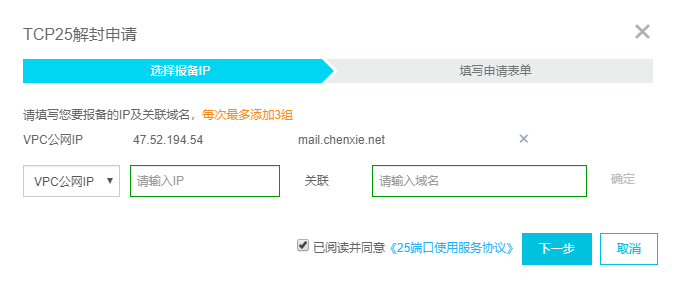
我们Zimbra邮件系统已经装好了,但是由于阿里默认禁止25端口出去,也就是你的邮件此时是无法向外发送的,只能接收到其他域给你发来的邮件,所以还需要去阿里云控制台申请25端口解封,能不能解封就看它心情以及你的运气了。
步骤如下:

本文链接:https://wexi.porsven.com/128813570217.html